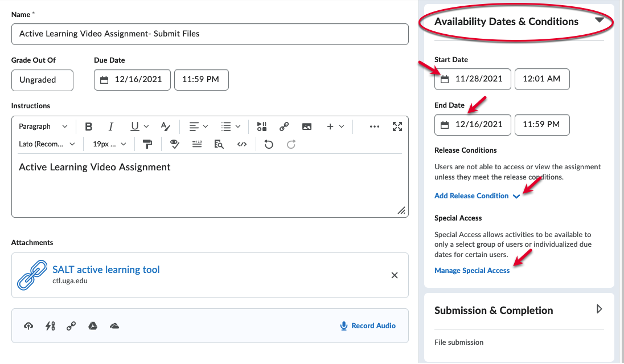


Availability Dates & Conditions allow you to identify a Start and/or End Date for your assignment, to set release conditions for the assignment, and to manage special access.
- Start Dates indicate when an assignment will be made visible to students, and End Dates close access to the Dropbox (that is, students will not be able to make submissions after this date). To create a Start Date and/or End Date for your assignment, simply fill in the blocks with your desired date and time.
- Release Conditions allow you to create a custom learning path for students to proceed through your course materials. For example, below are 3 common use-cases where release conditions are beneficial:
- Students need to submit assignments in a specific order, and you want to automate this process.
- You would like an assignment to become available after they take a Quiz, automatically.
- You would like to restrict an assignment to a specific group of students.
Release Conditions can be set using a condition type based on 10 different areas in eLC. These areas are: Assignments, Awards, Checklist, Classlist, Competencies, Content, Discussions, Grades, Quizzes, and Surveys.
- Manage Special Access allows you to restrict availability to only a select group of users or individualized due dates for certain users. There are two options here: Allow users with special access to submit outside the normal availability dates for this folder and Allow only users with special access to see this folder.